 6982ec198c
|
||
|---|---|---|
| hooks | ||
| .placeholder | ||
| Dockerfile | ||
| README.md | ||
| custom_build.sh | ||
| docker_hub_deployment.png | ||

README.md
docker-geoserver
How to run it
Pull the image from Docker Hub
docker pull geosolutionsit/geoserver
And run it
docker run --name gs -p 8080:8080 geosolutionsit/geoserver
Open your browser and point it to http://localhost:8080/geoserver .
GeoServer web interface will show up, you can now log in with user admin and password geoserver.
There are some environment variables you can use at run time:
JAVA_OPTSto customize JAVA_OPTS for the containerGEOSERVER_LOG_DIRto customize log placementGEOSERVER_DATA_DIRto put your GeoServer datadir elsewhereGEOWEBCACHE_CONFIG_DIRto put your GeoServer cache configuration elsewhereGEOWEBCACHE_CACHE_DIRto put your GeoServer cache elsewhereNETCDF_DATA_DIRto put your GeoServer NETCDF data dir elsewhereGRIB_CACHE_DIRo put your GeoServer GRIB cache dir elsewhere
How to build the Dockerfile with no helper scrips
If you want to build the image by yourself just run docker build from the root of the repository
docker build -t geoserver:test . --build-args GEOSERVER_WEBAPP_SRC="./geoserver.war"
There are build arguments to customize the image:
GEOSERVER_DATA_DIR_SRCto add your own custom datadir to the final image. This can be a local zip or directory or remote URL (see ADD instruction Doc)GEOSERVER_WEBAPP_SRCto add your own custom web app to the final image. This can be a local zip or directory or remote URL (see ADD instruction Doc) If you want to build or package your own web app you can customize the "mother" stage of Dockerfile accordingly
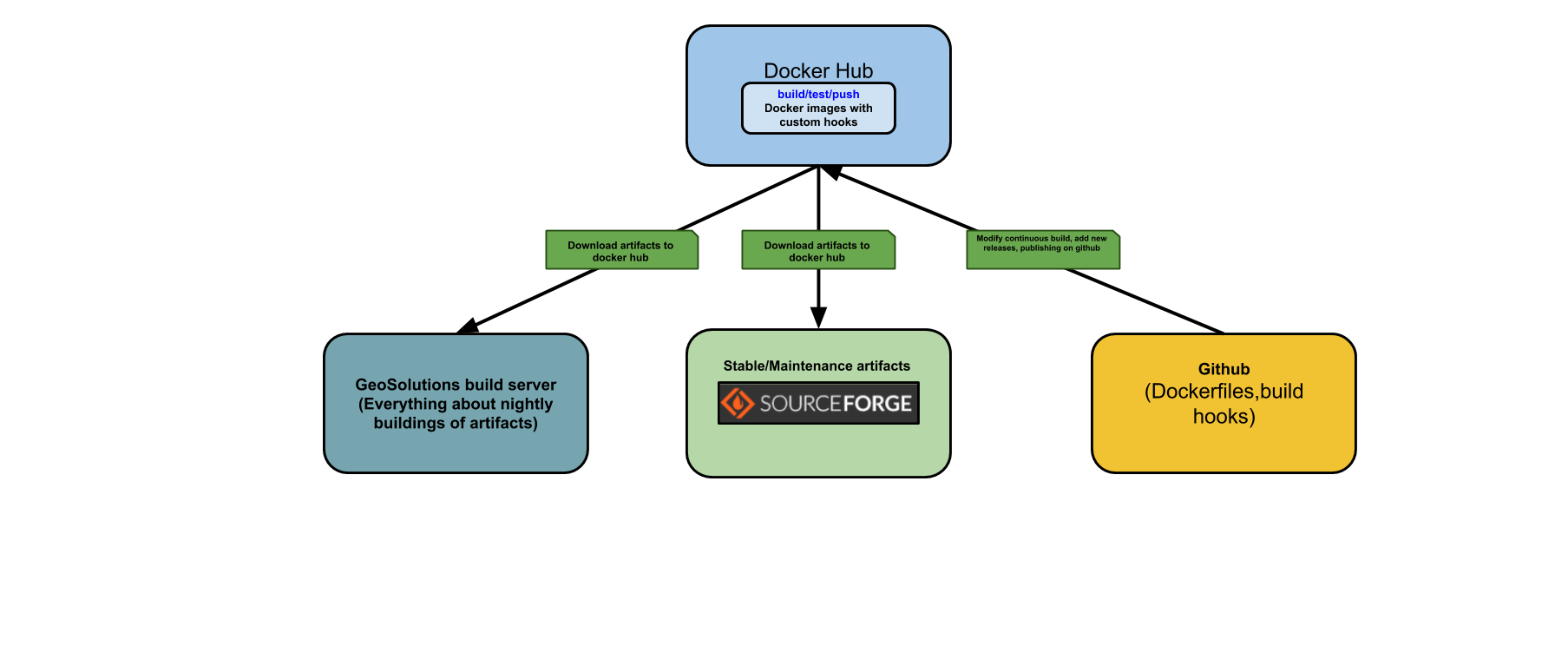
##Docker Hub build process and related helper scripts
Scripts provided that are for docker hub are under hooks directory.
Basically the hooks/build script takes these environment variables with current version numbers offered for geoserver:
export MAINT_VERSION="2.17.3 2.17.2 2.17.1"
export MIDDLE_STABLE="18"
export NIGHTLY_MAINT_VERSION="2.17.x"
export NIGHTLY_MASTER_VERSION="master foobar"
export NIGHTLY_STABLE_VERSION="2.18.x"
export STABLE_VERSION="2.18.1 2.18.0"
Notes:
Phantom version foobar is supposed to always fail as a test and always tried to be built.
"MIDDLE_STABLE" has just a function for the scripts logic, increase it with latest minor version number for stable.
To test locally build hook you can use the test_hooks.sh script provided.
How to use custom_build.sh script
the script can be run with no parameters to show the needed parameters:
./custom_build.sh
Usage: ./custom_build.sh [docker image tag] [geoserver version] [geoserver master version] [datadir| nodatadir] [pull|no pull];

[docker image tag] :          the tag to be used for the docker iamge
[geoserver version] :         the release version of geoserver to be used; you can set it to master if you want the last release
[geoserver master version] :  if you use the master version for geoserver you need to set it to the numerical value for the next release;
                              if you use a released version you need to put it to the release number
[datadir| nodatadir]:         if this parameter is equal to nodatadir the datadir is not burned in the docker images
[pull|no pull]:               docker build use always a remote image or a local image
             docker build use always a remote image or a local image
This script is meant to be used by Jenkins jobs, custom private builds, variety of tests with highly customized versions of geoserver. It can burn a custom datadir inside the docker image (it will expect data dir in ./resources/geoserver-datadir by default), or just create a dockr image with the geoserver artifact.
Example
./custom_build.sh my-docker-tag 2.18.x 2.18.x dev "no pull"